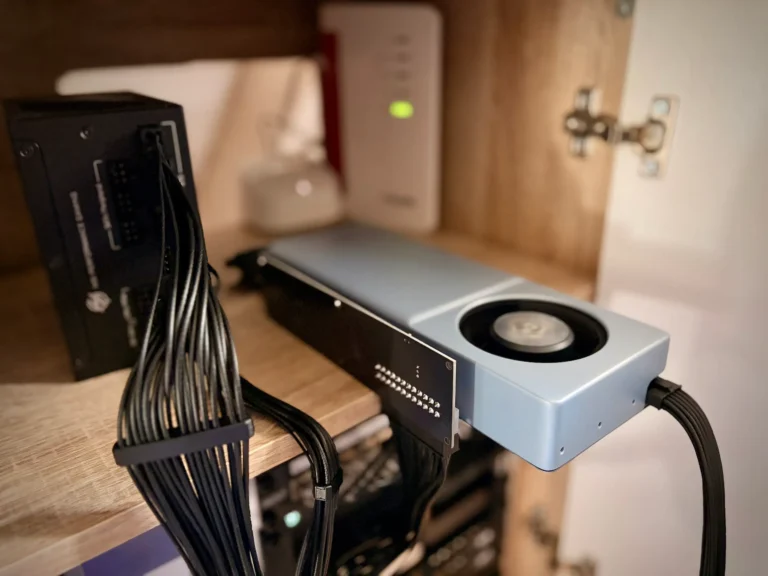

How to reduce power consumption and noise on an AMD Radeon AI PRO R9700. It’s all about undervolting, power capping, and fan speed control—finding the right balance between performance, power draw, and noise levels. The results showed a clear drop in power consumption from 300 watts to 210 watts and a reduction in fan speed from 3269 RPM to 2172 RPM, all while keeping performance steady.
Since the end of August, an AMD Radeon AI PRO R9700 has been connected via OCuLink to my Proxmox node and serves as the main GPU for llama.cpp in my LXC container. It’s fast, but it also gets loud under full load: under sustained load, the fan spins up to 3269 rpm, the junction temperature hits 97 °C, and the card draws its full 300 watts. In Germany, at a price of about 28ct/kWh, that’s ≈ 8.4ct
For the first time, I’m realizing that a prompt doesn’t just take time—it also makes noise. After all, my GPU isn’t in a data center anymore; it’s just one room away. So I wanted to know how quiet the GPU can get before it noticeably loses performance.
TLDR: 2172 rpm instead of 3269 rpm, 87 °C instead of 97 °C, 210 watts instead of 300 watts (5.88 ct instead of 8.4 ct). Token generation dropped by 1.2 percent. The path to getting there is more interesting than the numbers, because the obvious assumption was wrong.
Why you need a hash when undervolting
The most important part comes before the first measurement, and it has nothing to do with noise.
When an overclocked gaming card becomes unstable, the driver crashes or the image flickers. You notice that pretty quickly. With compute workloads under too strong an undervolt, the error isn’t so obvious: the card keeps computing, it just computes wrong. It doesn’t crash and doesn’t write anything to the log. An LLM then responds slightly differently, and that doesn’t really stand out.
Greedy decoding helps against that. With temperature 0, top_k 1, a fixed seed, and prompt caching disabled, the model’s output is bit-exact reproducible. I attached the SHA-256 of the response to each measurement:
r=$(curl -s -H "Content-Type: application/json" -d @req.json http://127.0.0.1:8080/completion)
h=$(printf "%s" "$r" | jq -r ".content" | sha256sum | cut -c1-16)
If the hash stays the same across all runs, the card computed identically. If it deviates, it’s over. Without this test, an undervolt can’t be validated, only unnoticed.
The baseline ran through 55 iterations at factory settings, all 55 with the same hash 8402b35b0a52413d. This confirmed that the Canary (beep beep) works.
The Measurement Setup
Two different points, because GPU data sits on the host, but the load runs in an LXC container (LX Container?).
On my Proxmox node, /usr/local/bin/gpu-sample.sh writes a CSV every two seconds with power, cap, shader and memory clock, voltage, fan speed, three temperatures, utilization, and VRAM. /usr/local/bin/gpu-summary.sh analyzes it and discards two things: the first 300 seconds, because the card is still thermally warming up, and all lines with less than 50 percent utilization (idle phase).
In the container, the rest is under /root/gpu-tuning/. The prompt consists of 200 identically built lines, 29,692 bytes, exactly 6092 tokens. The fixed length is important, otherwise the prefill between two runs isn’t comparable. measure.sh fires n iterations against the running llama server and logs throughput, draft acceptance, and hash.
Measurement is deliberately done over HTTP against the already loaded server, not via llama-cli. The 24-GB model (I tested with a Qwen3.8-27B-UD-Q6_K_L) takes nine minutes to load; against the server, one iteration takes 21 seconds. More importantly: this way you measure the real production configuration with MTP draft and q8_0 KV cache instead of a lab setup.
What a Lower Power Cap Really Brings
power1_cap can be written to while running, no reboot, no unlock. The lower limit is 210 watts, factory default is 300. I tested 260, 240, and 210 watts, 32 iterations each, with telemetry running alongside.
| Cap W | Prefill t/s | Δ % | Decode t/s | Δ % | Fan ⌀/max rpm | Junction ⌀/max °C | sclk Hz | vddgfx mV |
|---|---|---|---|---|---|---|---|---|
| 300 | 378.1 | – | 51.89 | – | 3147 / 3269 | 92.1 / 97 | 2846 | 948 |
| 260 | 362.8 | −4.0 | 51.87 | −0.0 | 2668 / 2744 | 88.3 / 92 | 2678 | 898 |
| 240 | 352.3 | −6.8 | 51.60 | −0.6 | 2444 / 2526 | 86.3 / 91 | 2589 | 864 |
| 210 | 335.8 | −11.2 | 50.91 | −1.9 | 2132 / 2185 | 84.1 / 87 | 2422 | 819 |
151 iterations across all four blocks, same hash throughout, draft acceptance consistently at 100 percent.
This table yields four insights – three of which are somewhat unexpected.
Token generation barely cares about the power budget. At 260 watts, the loss is unmeasurable; at 210 watts, it’s 1.9 percent. Decode is bound by memory bandwidth, and the memory clock stayed at 1258 MHz throughout the entire sweep. Only Prefill suffers from the cap, because Prefill does the computing.
The card gets barely cooler but significantly quieter. Junction temperature drops from 92 to 84 degrees, and fan speed from 3147 rpm to 2132 rpm. The SMU holds a target temperature and puts the saved budget into lower fan speed, not less heat. I later found confirmation in sysfs: FAN_TARGET_TEMPERATURE is set to 85 °C out of the box, and at 210 watts I measured 84.1.
Die Speichertemperatur rührt sich überhaupt nicht: rund 81 Grad, bei jedem Cap. GDDR6-Abwärme skaliert mit Bandbreite, nicht mit GFX-Leistung. Weder Power-Cap noch Undervolt ändern daran etwas, und mit 108 Grad als kritischem Wert ist das unproblematisch. Nur eine bessere Kühlung wäre da wohl interessant.
And for a fan target of 2800 rpm, you don’t even need a fan controller. Just 260 watts keep the card at 2744 rpm under sustained load. That was the point where the original idea took a positive turn: I wanted to cap the fan and realized that the power cap had already solved the problem.
By the way: Prefill efficiency increases from 1.27 to 1.60 tokens per second and watt, a 26 percent boost.
Unlock OverDrive
Undervolt and a hard RPM limit are both tied to the same gate. They only exist in sysfs when amdgpu OverDrive is active, and that exclusively unlocks Bit 14 of the kernel cmdline:
amdgpu.ppfeaturemask=0xfff7ffffYou can’t unload the module on a Proxmox host because the console framebuffer is attached to it — so a reboot is necessary.
This is where the first real pitfall lies. The Proxmox node boots UEFI via proxmox-boot-tool, but with GRUB. The effective kernel cmdline is therefore in /etc/default/grub, not in /etc/kernel/cmdline. My other nodes do it the other way around. proxmox-boot-tool status tells you which path is correct in this case.
The second unknown was whether it would work at all. The R9700 is a Pro card, and its PPTable might be locked by OverDrive firmware. In that case, the power cap would have been the end of the line. This command decides it:
cat /sys/module/amdgpu/parameters/ppfeaturemask
ls /sys/class/drm/card*/device/gpu_od/
It doesn’t lock. gpu_od/fan_ctrl/ appeared in full, and OD_RANGE allows a voltage offset down to −200 mV and a clock offset from −500 to +1000 MHz.
The Undervolt Leaders
pp_od_clk_voltage takes an offset in millivolts, followed by a commit:
echo "vo -50" > /sys/bus/pci/devices/0000:03:00.0/pp_od_clk_voltage
echo "c"      > /sys/bus/pci/devices/0000:03:00.0/pp_od_clk_voltage
Contrary to what many guides claim, power_dpm_force_performance_level doesn’t need to be set to manual for this. auto is enough.
I ran the offsets 0, −25, −50, −65, and −80 mV, 32 iterations each, all with a fixed 210-watt cap. A fresh reboot in between, so the comparison doesn’t span across a restart.
| Offset mV | Prefill t/s | Δ % | Decode t/s | sclk | vddgfx mV | Junction ⌀/max °C | Fan ⌀/max rpm | Power W |
|---|---|---|---|---|---|---|---|---|
| 0 | 337,8 | – | 50,86 | 2429 | 820 | 82,2 / 86 | 2102 / 2129 | 210,0 |
| −25 | 341,4 | +1,1 | 51,07 | 2488 | 811 | 83,8 / 88 | 2115 / 2153 | 208,5 |
| −50 | 347,5 | +2,9 | 51,26 | 2541 | 803 | 83,7 / 87 | 2120 / 2172 | 208,7 |
| −65 | 351,3 | +4,0 | 51,41 | 2551 | 795 | 83,6 / 87 | 2123 / 2173 | 206,7 |
| −80 | 355,3 | +5,2 | 51,49 | 2586 | 794 | 83,7 / 88 | 2122 / 2167 | 207,5 |
160 iterations, the same hash 160 times, draft acceptance at 100 percent throughout, no ring timeouts, no GPU resets, nothing in dmesg.
The key detail is in the two middle columns. Fan speed and junction temperature stay practically flat across the entire range; undervolting changes nothing in terms of noise or heat. What changes is the clock, going from 2429 to 2586 MHz at a constant 207 to 210 watts. With a fixed power cap, every bit of voltage saved shows up as extra clock speed within the same budget, not as a cooler card.
That’s not a downside, you just have to expect it the right way around. The Power-Cap is responsible for smooth operation. Undervolt recovers some of the performance the Cap cost you.
Why −50 mV and not −80
The tester found no error limit. Even −80 mV ran 32 of 32 cleanly.
My rule of thumb is: one full step below the lowest clean value. Mathematically, that would be −55 mV. I went with −50 because that’s the closest value I actually measured.
The margin is intentionally generous. Twelve minutes of load with a single workload don’t prove months of stability. The failure mode is silent miscalculation under an unfavorable combination of temperature and instruction mix, not a crash you’d notice. Cost compared to −80 mV: 2.3 percentage points Prefill, 0.4 points Decode. But I sleep better.
By the way, OD_SCLK_OFFSET remains unused. With a fixed Power-Cap, that would be a second knob in the same direction.
So it survives the reboot
A reboot resets everything. For the values to survive, you need three things at once.
The Kernel-Cmdline enables OverDrive, otherwise two of the three knobs don’t even exist. A systemd-Oneshot-Unit writes Cap, speed limit, and Offset on every boot, ordered Before=pve-guests.service:
[Unit]
Description=Apply power, fan and voltage policy to Radeon AI PRO R9700
Before=pve-guests.service
ConditionPathIsDirectory=/sys/bus/pci/devices/0000:03:00.0

[Service]
Type=oneshot
RemainAfterExit=true
ExecStart=/usr/local/sbin/r9700-tune.sh
And third, all sysfs accesses go through the PCI address, never through /sys/class/hwmon/hwmonN. This isn’t a style choice. The hwmon index shifted from hwmon6 to hwmon7 and back again over two reboots. A hardcoded path would have worked on the first restart, then the second, but silently pointed to the wrong GPU in between. The host has an iGPU that also shows up there.
D=/sys/bus/pci/devices/0000:03:00.0
H=$(ls -d $D/hwmon/hwmon* | head -1)
echo 210000000 > "$H/power1_cap"
The whole thing got tested through an accident. I accidentally rebooted my Proxmox node, and since the speed limit and undervolt settings had only been written to a running system up to that point, that was exactly the missing piece. After booting, all three values were correctly restored without any input from me, and the run delivered 12 out of 12 with the same hash as all 160 previous sweep iterations.
What changed in the repo
I set everything up with Ansible to keep the state reproducible, instead of doing it all manually.
proxmox_node.yml holds the values:
ai1_gpu_power_cap_w: 210
ai1_gpu_fan_max_rpm: 2800
ai1_gpu_voltage_offset_mv: -50
ai1_amdgpu_ppfeaturemask: "0xfff7ffff"
ai1_gpu_bench_reference_hash: "8402b35b0a52413d"
The reference hash is deliberately included in the configuration. It serves as the target value that a later verification run checks against, and without it, the measurement series would be worthless after a few weeks.
The short version for your GPU
If you want to replicate this, follow this order:
- Set up a determinism test and run it against factory settings. If the hash already fluctuates there, the method isn’t suitable for this workload, and the rest is a waste of time.
- Lower the power cap in steps, with telemetry. This is the lever for noise and power consumption, costs no OverDrive, and is immediately reversible.
- Only if that’s not enough, enable OverDrive. Before that, check which Cmdline file the bootloader actually reads.
- Test undervolting as a conductor and provide a safety margin.
- Persist everything via the PCI address, before starting the node.
Bottom line, compared to the shipping state: The fan speed dropped from 3269 to 2172 rpm, the max junction temperature from 97 to 87 degrees, and power consumption from 300 to 210 watts. Prefill costs 8.1 percent, Decode 1.2.
These are just numbers on paper, of course, but the noise level is significantly, significantly better, with nearly the same performance and lower power consumption. A win-win-win situation.
